
Tradervue has been grading trades since 2008, and over 200,000 traders have run their fills through it since then. StockBrokers.com still rates it 4.5 out of 5 for analytics in its 2026 review, putting it near the top for raw reporting depth. That track record matters if you are a futures trader, a prop firm challenge participant, or a swing trader trying to decide whether a journal with this much history is still worth paying for today. What follows covers what it costs, what it actually does for your trading, what real users say about using it day to day, and which tools people switch to when they outgrow it.
Table of Contents
What You Get With TraderVue Features
TraderVue connects to more than 80 brokers, including Interactive Brokers, Charles Schwab, and Fidelity, so your fills pull in without manual entry. Brokers it doesn't sync with directly, like Robinhood, still work through a manual CSV upload. That setup covers stocks, options, futures, and forex in one account.
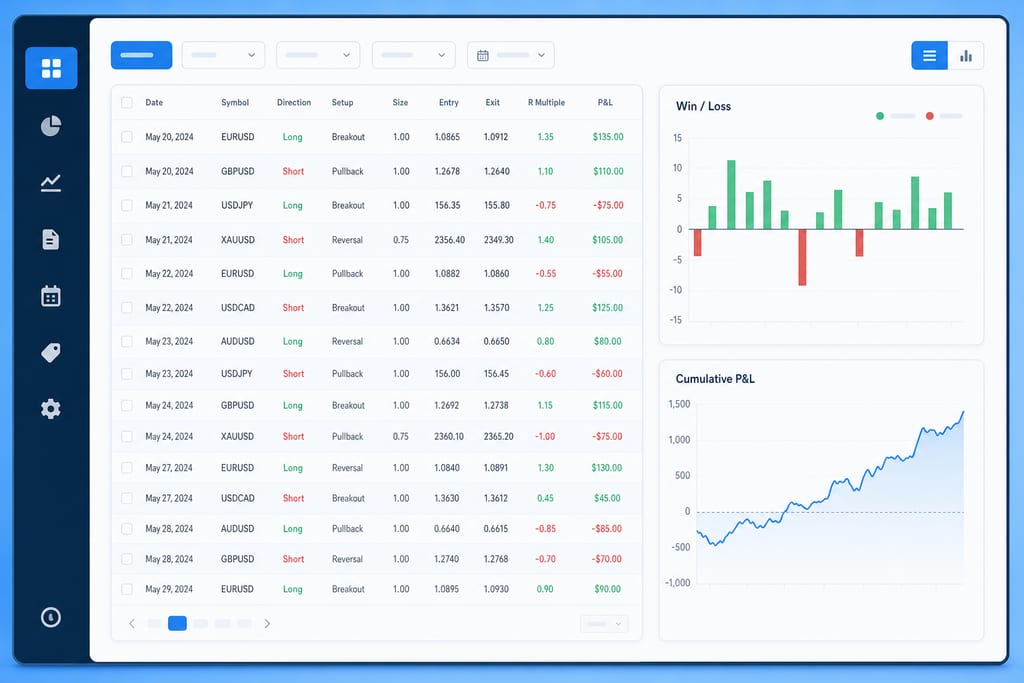
The dashboard runs on five core reports: Win/Loss Ratio, Win/Loss P&L Comparison, Trade Expectation, Cumulative P&L, and Cumulative Drawdown. All five calculate from closed trades only, so open positions won't show up until they're settled. That's useful if you close out most positions same day, less so if you carry swing positions across weeks.
- Win/Loss Ratio: how often you win versus lose
- Win/Loss P&L Comparison: average dollar size of wins versus losses
- Trade Expectation: expected value per trade
- Cumulative P&L: running account total over time
- Cumulative Drawdown: how far you've pulled back from peak equity
One limit worth flagging before you sign up: TraderVue is web-only, with no desktop app and no mobile app. Journaling is also limited to one default note template, with no AI-generated insights, no trade replay, and no backtesting built in.
TraderVue Pricing for Each Plan
TraderVue runs three tiers: Free, Silver, and Gold. The free plan caps you at 30 trades a month and gives little beyond personal notes, no real analysis layer.
Silver runs $29.95 a month or $323.46 a year, a 10% discount for paying annually. It unlocks unlimited uploads, full reports, and mentorship-program sharing, but it still skips liquidity reports, risk tracking, and exit analysis.
Gold costs $49.95 a month or $479.52 a year, a 20% annual discount, and adds exit analysis, advanced filters, and liquidity, risk, and commissions/fees reporting. StockBrokers.com names Gold as TraderVue's most popular tier. A 7-day free trial exists, but it requires a credit card to start.
- Free: 30 trades/month, notes only
- Silver: $29.95/mo or $323.46/yr, unlimited uploads and reports
- Gold: $49.95/mo or $479.52/yr, adds exit, liquidity, and risk analysis
Futures and prop firm traders generating dozens of fills a week will blow through the free tier fast, which pushes most serious users straight to Silver or Gold.
What Traders Say and Where It Falls Short
StockBrokers.com's 2026 review praises TraderVue's analytical depth, chatbot support, and an active user community built up over years of daily use. The same review flags high price, a cluttered initial dashboard, and a very limited free version as the main complaints. TradeZella's comparison piece goes further, calling TraderVue's layout a spreadsheet-style design that feels outdated next to newer dashboards.
Newer tools expose the gaps most clearly for active traders comparing options today. TraderVue has no AI trading partner, no automated or manual backtesting, no trade replay, no prop firm sync, and no economic calendar, according to TradeZella's feature breakdown (source).
- No AI-driven trade feedback or daily briefing
- No backtesting, manual or automated
- No trade replay to review price action after the fact
- No direct prop firm sync
- No built-in economic calendar
A Reddit thread in r/Daytrading, titled "Any opinions on why a service like Tradervue...", shows traders actively debating whether paid journaling services are worth the monthly cost at all. If reports and history are what you need without the extra feature set, MyTraderScore covers that from a CSV upload with no broker connection or setup required.
Picking Between a Journal and a Trading Score
Count your monthly trade volume first. If you log under 30 trades a month, the free tier holds you for a while; past that, you're paying $29.95 or $49.95 a month whether or not you use the exit, liquidity, and risk reports in Gold. Weigh that cost against what you actually want out of a journal. If you want someone to grade your discipline and tell you when to stop trading for the day, a spreadsheet-style report log won't do that. MyTraderScore skips the setup and note-taking entirely, grades your CSV on a Trader Score, and hands you a daily briefing on what to trade and when to stop, which is the piece a pure journal was never built to give you.
Stop losing trades and start making more money.
Start freeCommon Questions About TraderVue
Does TraderVue work if I trade on a prop firm account?
TraderVue has no direct prop firm sync, according to TradeZella's feature breakdown. You can still get fills into the account through manual CSV upload or broker connection if your prop firm routes through a supported broker, but there is no built-in link to prop firm platforms the way some newer journals offer.
Can I cancel TraderVue mid-year and get a refund for unused months?
That isn't something covered in TraderVue's published pricing or the 2026 reviews referenced here, and it isn't listed on their plan pages either. Before you commit to the annual Silver or Gold rate, contact TraderVue support directly and get their refund policy in writing, since the monthly plan is the lower-risk way to test it first.
Will my broker's CSV format actually import cleanly into TraderVue?
If your broker is one of the 80-plus TraderVue syncs with automatically, fills should pull in without formatting issues. For brokers outside that list, like Robinhood, you upload a CSV manually, and how cleanly that works depends on how closely your export matches TraderVue's expected columns. Testing with a small batch of trades first is the safest way to check before uploading months of history.